02Web applications

Browser software that does real work.

Booking engines, admin panels, portals and internal tools — software your customers and your team use every day, in any browser, with nothing to install.

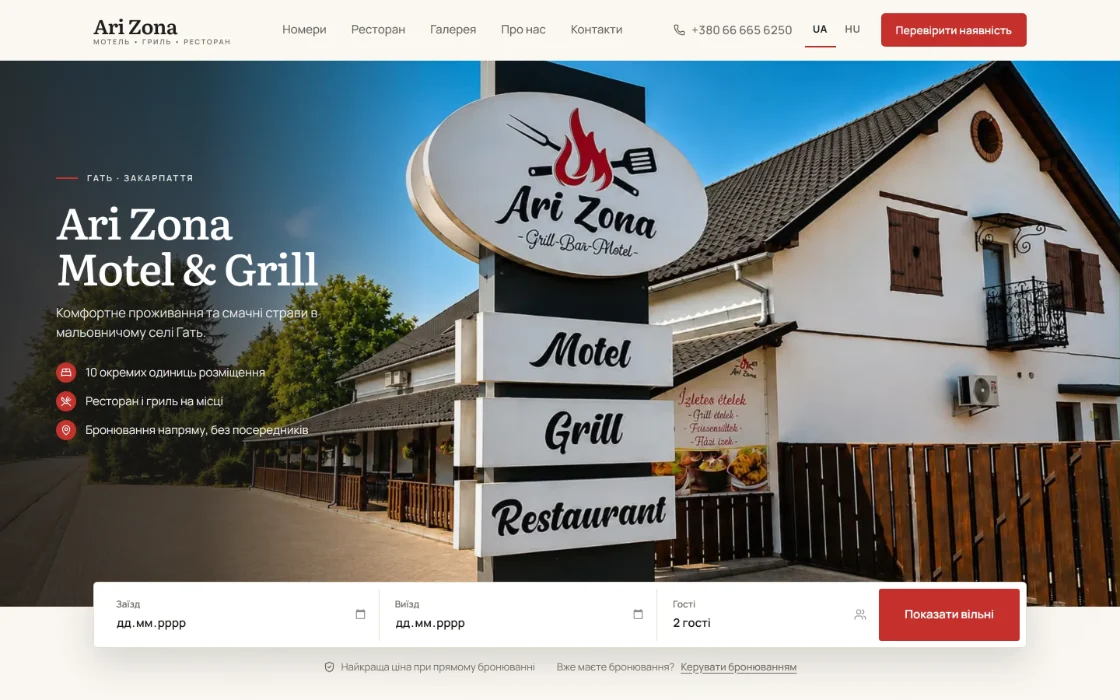
Real client workOn this page: the Ari Zona booking engine, live — and three menus whose owners update items and prices themselves.

  1. 01Dates and guests
  2. 02Free units, live
  3. 03Whole-stay total and 30% prepayment
  4. 04A request number, AZ-…
  5. 05The guest finds the booking again

02 — 03Availability · 2 nights, 2 guests

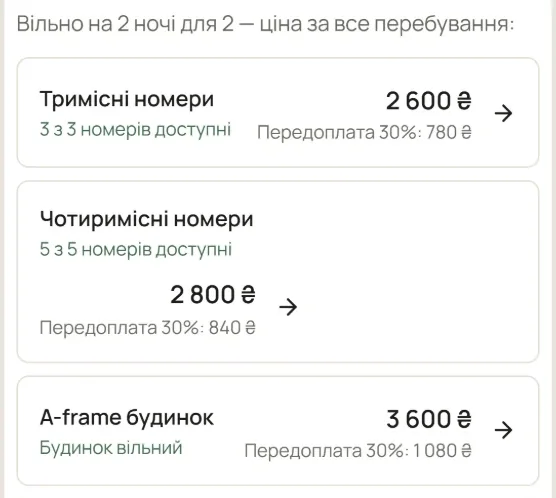
Ari Zona availability for two nights and two guests: triple rooms, 3 of 3 free, 2 600 ₴; quadruple rooms, 5 of 5 free, 2 800 ₴; the A-frame house, free, 3 600 ₴ — each with its 30% prepayment, and a link to book with these dates.

04 — 05Find my booking · request number and phone

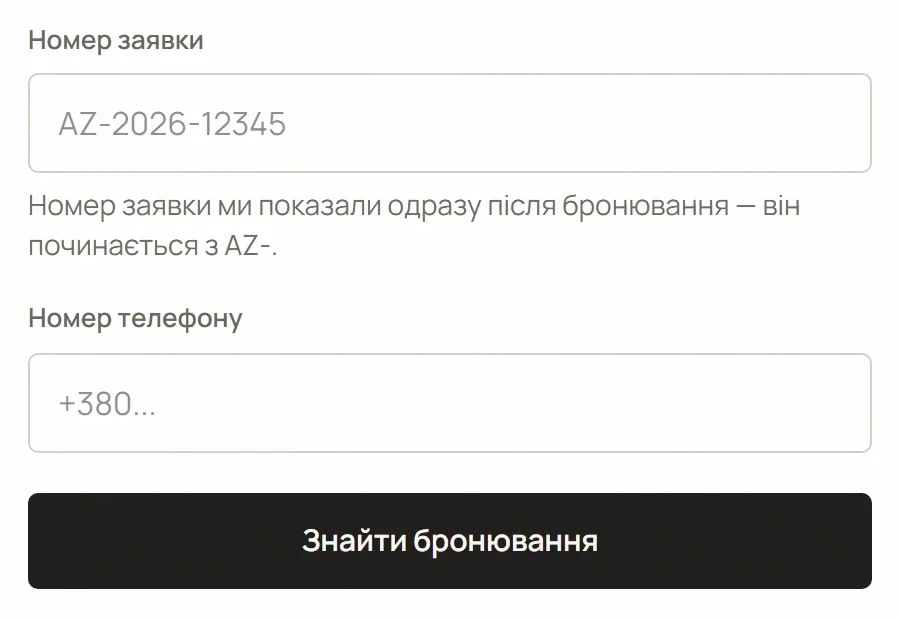
Ari Zona “find my booking” form: the request number, which starts with AZ-, the phone number and a Find booking button.
Real client workgatiarizona.com.ua · the Ari Zona booking engine, live. Interface in Ukrainian.

What it solves

What browser software takes off your hands.

Five kinds of daily work a web application can do instead of people — and where each one is running live today.

  1. Guests message to ask whether a room is free — and wait for the answer.

    Availability for the chosen dates, shown the moment they ask.

    Ari Zona — free units for the chosen dates, live

  2. Every enquiry means working out a price by hand.

    The total for the whole stay and the prepayment, calculated on the spot.

    Ari Zona — whole-stay total and 30% prepayment

  3. Bookings get lost between calls, chats and notebooks.

    Every booking gets a request number the guest can use to find it again.

    Ari Zona — find a booking by its AZ- number and phone

  4. Changing a price means waiting for the developer.

    An admin panel where you update items and prices yourself.

    Don Corleone, Stare Misto, Sushi From Serg — menus with their own admin panel

  5. Your team works around tools that don’t fit the business.

    Portals, dashboards and internal tools built around how you actually work.

    Shown as a sanitized preview on the business systems page

What we build into it

What goes into a HatalyX web application.

Each application is scoped around one business. These are the building blocks we use most — your offer lists exactly which ones yours includes.

Booking & availability

  • Date and guest selection
  • Live availability by room or unit type
  • Whole-stay totals and prepayment amounts
  • Booking requests with their own request numbers
  • Booking lookup by request number and phone

Admin panels

  • Items, prices and photos you edit yourself
  • Categories, menus and catalogues in several languages
  • Plain screens for people who aren’t developers
  • Separate access for owners and staff — when roles are in scope

Portals & internal tools

  • Customer portals: requests, documents, status
  • Dashboards with the figures you actually check
  • Enquiry intake from your website
  • Notifications by email or messenger — when in scope
  • Integrations with services you already use — scoped per project
  • Hosting set-up, handover and training at launch

Example interface

Ari Zona on a phone, read closely.

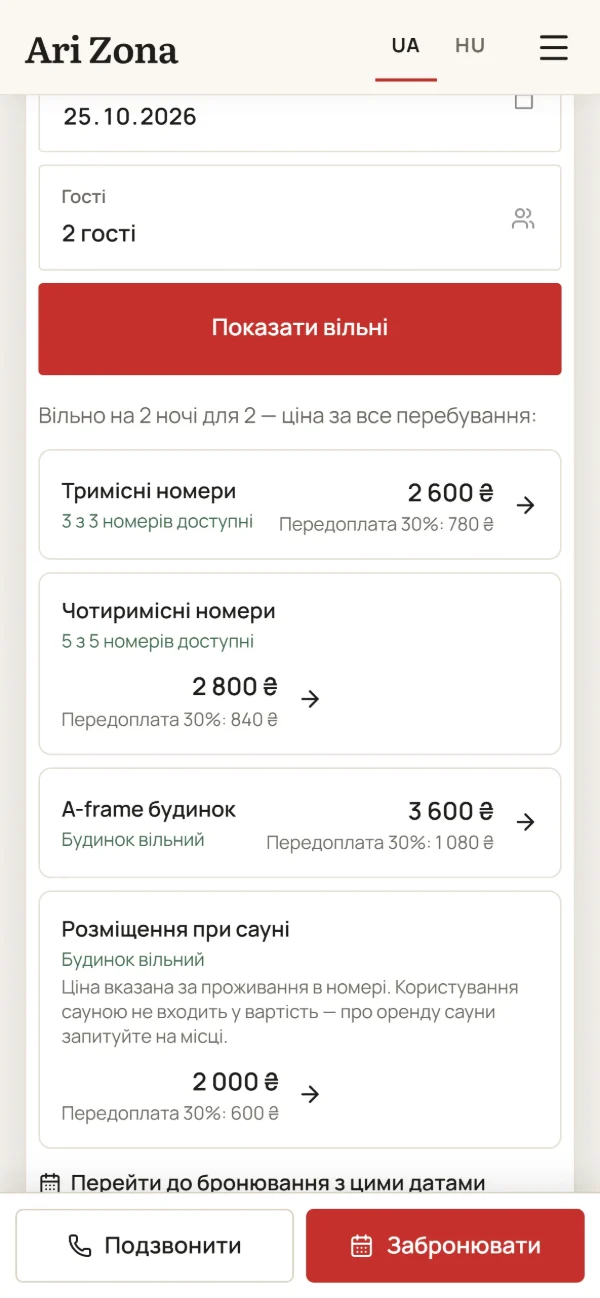
Guests often search from a phone, on the road. The same booking engine answers there — dates, free units, the price and the way to book, all on one screen.

Ari Zona on a phone: dates and guests, the Show free button, available rooms with whole-stay prices and prepayments, and a fixed bar with Call and Book.
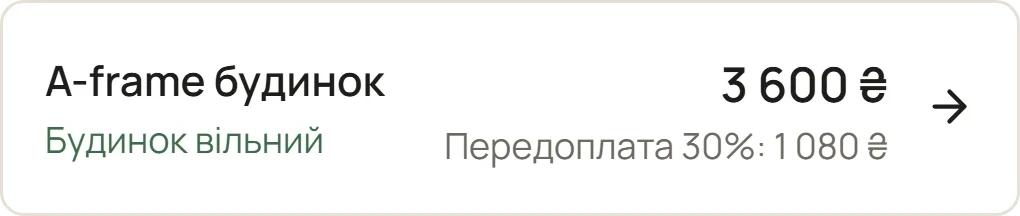
One availability result: the A-frame house, free, 3 600 ₴ for the stay, 30% prepayment 1 080 ₴, with an arrow into booking.
The fixed bar at the bottom of the phone screen: Call and Book.
Real client work gatiarizona.com.ua · in Ukrainian and Hungarian · direct booking without intermediaries.
  1. Dates and guests first

    The search starts with what the guest already knows. One button — “Show free” — answers it.

  2. One line, everything needed

    The A-frame house, free: 3 600 ₴ for two nights, 1 080 ₴ prepayment — and an arrow straight into booking.

  3. Call or book, always in reach

    A fixed bar keeps both choices under the thumb, wherever the guest scrolls.

In the work

Running live, used every day.

The booking engine behind a motel, and the admin panels behind three menus — software real businesses and their guests use daily.

Motel, grill & restaurant · Gat, Zakarpattia

Ari Zona

Direct booking without intermediaries: live availability for the chosen dates, the price for the whole stay, a 30% prepayment, and bookings found again by request number. Website in Ukrainian and Hungarian, with a separate restaurant e-menu.

  • Booking engine
  • Live availability
  • Booking lookup
  • UA · HU
Read the case study

Menus their owners update themselves

Don Corleone, Stare Misto and Sushi From Serg each run on their own admin panel: the owners change items and prices without calling a developer. The panels are private, so they aren’t shown here — the owners’ words are.

“Through the admin panel, we can update items and prices without needing to contact a developer every time.”

Don CorleoneRestaurant & pizzeria · Dyida

“A major advantage for us is being able to update the selection and prices ourselves through the admin panel.”

Sushi From SergSushi · Netishyn
  • Don Corleone

    Restaurant & pizzeria · Dyida · digital menu with its own admin panel

    don-menu-pi.vercel.app
  • Stare Misto

    Café, restaurant & billiard club · Vynohradiv · food and bar menus, own admin panel

    stare-misto-qr-menu.vercel.app
  • Sushi From Serg

    Sushi · Netishyn · searchable menu with its own admin panel

    sergs-sushi-shine-main.vercel.app

Real client workPublic menus, live. The admin panels behind them are private.All work

How the work goes

From first conversation to launch.

Five steps, the same for everything we build. You know what you get, for how much and when — before any work starts.

How projects are scoped and paid
  1. 01

    Consultation

    We get to know your business and your goals. A short conversation shows what you need — and what you don’t.

  2. 02

    Offer & plan

    A detailed offer and plan: exactly what you get, for how much, and when.

  3. 03

    Design & development

    We design and build the system and keep you informed along the way — no black boxes.

  4. 04

    Testing & approval

    We test on key screen sizes and modern browsers, fix what we find, and prepare the launch with your approval.

  5. 05

    Launch & support

    We launch, train you to manage it, and stay close afterwards — one message, and we help.

Other services

The rest of what we build

All services, side by side
  • Websites

    Corporate, catalogue, hospitality and ordering sites — built around how customers decide.

  • Mobile applications

    Phone-first products for daily use — shown as a HatalyX concept.

  • CRM & business systems

    Customers, requests, projects and documents — one place for the team to work.

  • Commerce & booking

    Catalogues, price lists, ordering, reservations and availability.

  • AI & automation

    Automations and AI-assisted drafts — with a person making the decisions.

Start a project

Have something in mind? Let’s build what your business actually needs.

A free, no-obligation conversation. Tell us about the business — we’ll recommend only what is worth building.